


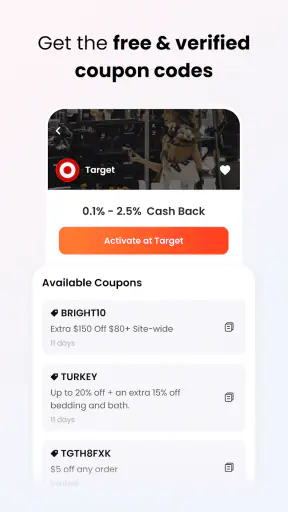
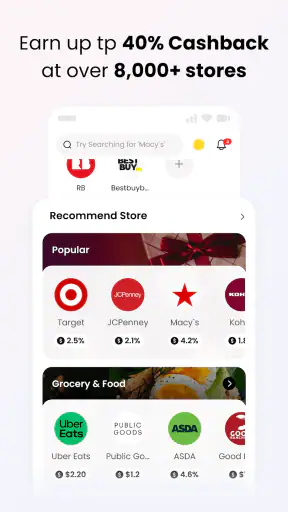

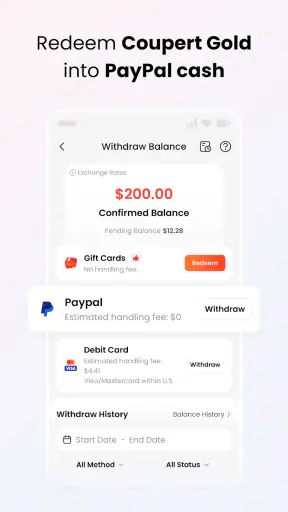

I usually judge a shopping app by what happens in the few seconds before I pay. Does it help me save without creating another task, or does it make checkout feel like a scavenger hunt? Coupert takes the first approach: it is designed to look for available coupons and cashback while I shop online, rather than asking me to search through deal pages before every purchase. That makes it appealing when I want a quick check before committing to an order.
It is a free shopping app from Coupert, aimed at Everyone, and it has grown to more than a million installs. Its average score sits at 4.6 from roughly fifteen thousand ratings, which suggests that the basic idea works well for many shoppers. My own view is more measured: it can become a useful checkout habit, but its value depends heavily on a live internet connection, the store being recognized correctly, and the user paying attention to the final conditions of a coupon or cashback offer.
How Coupert fits into real mobile shopping
The central experience is simple. I open a shopping site, reach the point where a discount code or reward might apply, and let Coupert look for an opportunity. That is different from manually searching the web for a code, opening several result pages, copying suspicious-looking strings, and returning to the cart to test them one by one. The time saved is not always dramatic, but over repeated purchases the reduced friction is the main reason to keep the app available.
That convenience also explains why connectivity matters so much. Coupon discovery and cashback checking are online activities. If the connection is weak while I am moving between Wi-Fi and mobile data, the useful part of the experience can slow down exactly when I am ready to pay. I would not treat this as a tool for preparing a shopping list offline. I see it as a connected checkout assistant whose usefulness appears when the retailer page, the app, and the relevant offer can communicate properly.
A realistic example is ordering household supplies during a lunch break. I may already have the products in my cart and only a minute or two to finish the purchase. Instead of opening a search engine and trying several coupon pages, I check Coupert at checkout. If it identifies a usable saving, the process feels efficient. If the store page is slow or the connection drops, the advantage disappears quickly, so I keep the original cart total in mind rather than assuming a saving will appear.
That last habit is important. I never consider a discount real until I see the revised total or the checkout clearly confirms the reward conditions. A coupon may require a minimum spend, exclude certain products, or fail because another promotion is already active. Coupert can reduce the effort of finding possibilities, but it cannot turn every possibility into a guaranteed reduction. The app is best understood as a filter for opportunities, not a promise that every order will become cheaper.
Why the network is part of the feature
Many shopping apps can still show saved products or previously viewed information when a connection is unavailable. Coupert is different in the moments that matter most: the current offer has to be checked against a live shopping session. A stale code is often worse than no code because it wastes time and can make the shopper doubt whether the checkout itself is broken.
I therefore prefer using it when my connection is stable, especially for a large order where a failed coupon attempt could lead me to abandon the purchase. On mobile data, I would avoid repeatedly refreshing the same checkout screen. A single careful check is usually more sensible than tapping through several times while the network is fluctuating. This is a small workflow change, but it makes the app feel less temperamental.
There is another practical trade-off. The app can be useful while I am already shopping, but it is not necessarily the fastest route for every purchase. If I know a retailer’s own sale is already strong, I may go straight through the store’s app or website. If I am comparing several retailers, I may first compare final prices, delivery charges, and return terms. A coupon tool should come after those basics, not replace them.
Using it while moving, travelling, or shopping from a phone
Coupert makes the most sense for people who complete purchases on a phone and do not want to switch constantly between a retailer, a browser search, and a coupon page. The mobile context is convenient when I am sitting on a train, waiting in a queue, or ordering something from the sofa. The smaller screen makes manual coupon hunting particularly annoying, so an automatic check has more value than it might on a desktop with several windows open.
At the same time, mobile checkout is more vulnerable to interruptions. A phone call, a weak signal inside a building, or a switch from Wi-Fi to cellular data can interrupt the path between the store and the offer check. I recommend keeping the cart open, noting the original subtotal, and avoiding unnecessary navigation until the coupon or cashback result has been settled. That gives me a reference point if the page reloads.
For quick purchases, I use Coupert as a final checkpoint rather than as the first app I open. I choose the product, compare the retailer’s own price, review shipping, and then check for a coupon or cashback opportunity. This order prevents the saving search from distracting me from the real cost. It also avoids a common mistake: adding unwanted items just to reach a threshold that makes a code appear attractive.
For larger purchases, the mobile experience deserves more patience. I read the offer details before activating anything, keep the checkout in the same session, and confirm that the saving has actually been reflected. If the connection is unreliable, I would rather wait until I have dependable Wi-Fi than make a rushed purchase based on an unverified offer. That is especially true when the order is difficult to cancel or return.
What happens when a check fails
The most frustrating situation is not finding no coupon; it is seeing an offer appear and then having it fail at the last step. In that case, I first check whether the retailer page has fully loaded, whether the cart changed after the offer was found, and whether the code has specific purchase conditions. I then refresh only once, because repeated retries on a poor connection can create confusion without improving the result.
If the app does not produce a saving, I continue with a simple fallback: compare the store’s current promotion with the original total and decide whether the purchase is still worthwhile. This keeps Coupert in its proper role. It is a helpful layer over shopping, not the sole reason to buy. A product should remain reasonably priced after delivery and other charges even when no coupon works.
Cashback requires the same caution. I treat it as a possible later benefit rather than an instant discount at the register. Before relying on it, I look for the applicable conditions and make sure I understand whether the purchase must begin through a particular path. I also avoid opening unrelated shopping tabs midway through the process, because a clean, continuous session is easier to verify than a checkout assembled from several disconnected routes.
These habits are not glamorous, but they are where experienced use differs from simply installing the app. The best recovery method is to preserve the original order details, confirm the final amount, and stop if the process becomes unclear. Saving a little money is not worth losing a promotional price, duplicating an order, or spending more time than the saving justifies.
Keeping data use under control
Because the app is built around current shopping pages and current offers, I expect it to be most active while I am browsing or checking out. I use it selectively rather than leaving every possible shopping session running in the background. My practical approach is to open it when I have a specific purchase in mind, complete the check, and then close the shopping task instead of casually browsing deals for long periods.
That approach is useful for two reasons. It keeps my attention on the purchase, and it avoids treating every notification or offer as a reason to spend. A coupon app can encourage unnecessary shopping if I start with the discount rather than the need. I get more value when I use Coupert to reduce the cost of something I already decided to buy.
On mobile data, I would use it with the same restraint I apply to any connected shopping service. I wait for product pages and checkout totals to finish loading before trying another action, and I avoid refreshing repeatedly. If I am in an area with an unstable signal, I save the purchase for later rather than burning time and data on a checkout that may not complete cleanly.
Privacy and trust also deserve ordinary caution. I do not enter payment details into an unfamiliar page simply because a coupon appears. I check that I am still on the retailer’s legitimate checkout and review the final order before confirming. Coupert can help discover savings, but normal shopping safeguards still apply: use the official store session, inspect the total, and do not let urgency override judgment.
How it compares with ordinary coupon hunting
The usual alternative is a web search for a retailer name followed by “coupon” or “promo code.” That method can uncover more discussion and more competing offers, but it also produces expired codes, misleading pages, and a lot of manual copying. Coupert’s advantage is convenience at the point of purchase. I do less hunting and can judge an offer in the context of the cart I am already using.
A retailer’s own app can still be better when its loyalty pricing, member benefits, or in-app promotions are central to the purchase. A cashback-focused service may also suit someone who compares reward rates across several programs before buying. Coupert is the better fit for shoppers who want one quick check without turning every order into a research project, but it is not a substitute for comparing the complete final price.
Desktop browser tools may feel more comfortable for people who manage many tabs and want to inspect several retailers side by side. On a phone, Coupert’s appeal is stronger because switching between pages is more cumbersome. The trade-off is that mobile connectivity and page transitions can be less predictable, so I value its convenience most when the shopping session is short and the network is steady.
Who should install it, and who should skip it
I would recommend Coupert to frequent online shoppers who regularly reach checkout and want an automatic reminder to look for savings. It is particularly useful for people who dislike coupon websites, forget to search before paying, or shop from a phone where copying codes between screens is tedious. The free price makes experimenting with that habit easy, and the Everyone age rating keeps its audience broad.
I would be less enthusiastic for someone who buys online only occasionally, always uses a retailer’s own app, or already has a carefully managed rewards routine. In those cases, another layer may add little. I would also skip it for purchases where timing is more important than a possible discount, such as a limited-stock item or an urgent replacement. A failed coupon check should never cause me to lose the product or the retailer’s existing sale.
The app is available on older Android devices because its minimum operating system is Android 7.0. The current release is version 6.6.73, so I would keep it updated through the normal app store process. That matters for a connected shopping tool: compatibility and checkout behavior can change as retailer pages change, and an outdated installation is a poor starting point when a saving check fails.
My connectivity verdict
After using Coupert as a checkout habit, I see its strongest quality clearly: it moves coupon and cashback discovery closer to the moment when the decision matters. I do not have to begin every purchase with a long search, and on a phone that reduction in switching is genuinely helpful. The app from Coupert earns its place when I am already shopping, the retailer is supported in the expected way, and the connection is reliable.
Its limitations are equally clear. The experience depends on live pages, live offer checks, and careful confirmation. A weak signal, an expired condition, or a rushed tap can erase the convenience. I also would not use it as a reason to buy something I did not need, or assume that cashback has the same effect as an immediate price reduction.
My recommendation is to install it if you shop online often and want a low-effort final check before paying. Use it after comparing the real cost, keep the original total in mind, read the offer conditions, and give the connection time to respond. With those expectations, Coupert is a practical shopping companion rather than a magic discount button. It will not improve every purchase, but it can make connected mobile checkout less wasteful when used deliberately.


